01
Decide What’s Safe Today
See a daily, weekly, and monthly safe-to-spend view that responds as eligible connected transactions arrive.
Granite turns your income, bills, savings, and connected spending into one clear daily budget—then helps you see what's coming before it affects the rest of your month.

Granite updates your safe-to-spend view as connected transactions arrive, watches upcoming expenses and cash flow, and brings the most useful number to the places you already check.
Available on iOS, Android, and web
Download Granite Finance from the App Store or Google Play, or create an account on the web to start your daily budget.
Scan to download

Check today, this week, and this month at a glance
Look ahead to upcoming bills, payday, and lower-balance days
Stay informed with widgets, Apple Watch, and budget-change alerts

how it works
Connect the pieces of your monthly plan once, then let Granite show what is safe to spend today.
01
Add Your Income
Tell Granite what reliably comes in each month.
Net income
$5,678.00
02
Add Bills & Subscriptions
Account for recurring obligations before daily spending starts.
Monthly bills


Rent
Monthly
$1,789.00

Utilities
Monthly
$350.00

Internet
Monthly
$50.00
03
Add Investments & Savings
Protect the amounts you plan to save or invest before setting everyday spending room.
Savings plan

Personal Savings
Monthly
$400.00

Emergency Fund
Monthly
$250.00
Vacation Savings
Monthly
$750.00
04
Connect Spending Accounts
Link checking accounts and cards so your budget can respond as new activity arrives.
Connected accounts

Checking
Balance updates
•••• 4821
Set the plan once. Let Granite turn it into a number you can use every day.
Download the Appfeatures
Granite combines daily budgeting, upcoming expenses, cash-flow forecasting, and guided insights without turning your finances into another spreadsheet to maintain.
Spending by category
Illustrative example
Hover or tap a category to explore the example.
01
See a daily, weekly, and monthly safe-to-spend view that responds as eligible connected transactions arrive.
02
Use what-if planning to understand how a purchase today could change the rest of your week or month.
03
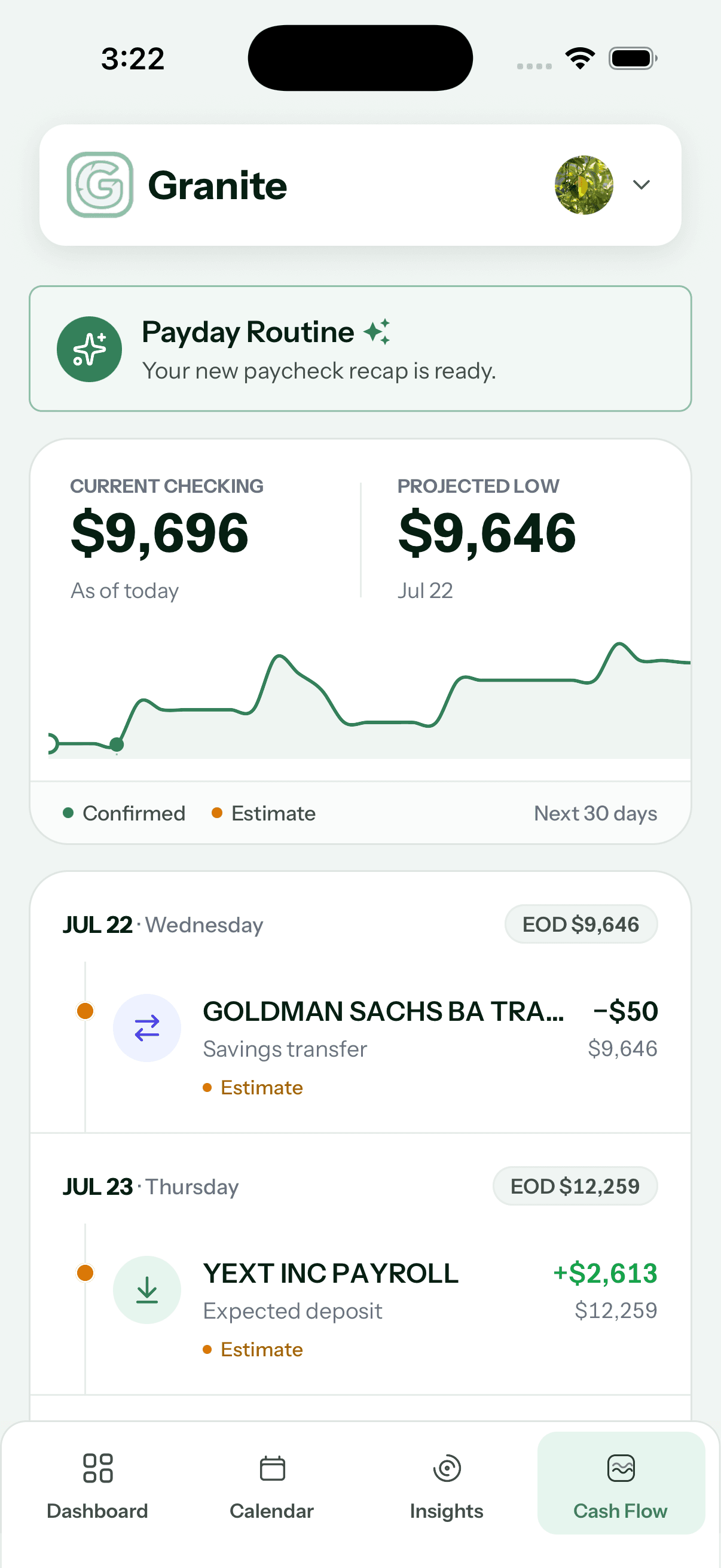
Preview 30-day cash flow, upcoming expenses, expected deposits, and potential low-balance days before they surprise you.
04
Use clear charts and AI-assisted insights to explore spending pace, recurring costs, categories, and monthly patterns.
05
Check Granite from home-screen widgets and Apple Watch, and optionally receive a push alert when your daily budget changes significantly.
06
With your authorization, Granite’s scoped MCP connection lets supported assistants answer eligible questions using your Granite financial context.
security & privacy
Financial context deserves deliberate protection—from bank connection through mobile access and optional assistant integrations.
Granite uses secure connection infrastructure to access transaction data without storing bank login credentials.
On supported devices, the operating system performs the biometric match. Granite does not receive or store an image of your face or fingerprint.
Supported assistant connections require authorization and are limited by the permissions granted to that connection. Available tools can also depend on subscription and Granite settings.
Granite does not sell personal information, and users can request account deletion and offboarding when they no longer need the service.
App Store reviews
Selected five-star reviews from Granite's U.S. App Store listing. Excerpts are shortened for display.
See Granite on the App Store“This app fixes that issue for me.”
Jumpinline23 · U.S. App Store reviewer
“By far the easiest to use.”
catcornakiss · U.S. App Store reviewer
“Surprisingly powerful and gave me insights I can use.”
Endorphin777 · U.S. App Store reviewer
Try Granite free for 7 days, then continue monthly or save with annual billing. Your app store shows the exact renewal terms before you subscribe.
Annual
$47.99
about $4.00 per month
Best value
Compare budgeting approaches
Some apps organize every dollar. Others help manage subscriptions or your full financial life. Granite is built around a more immediate question: what can I safely spend today?
One clear daily number
Best fit
A clear amount you can safely spend today
Budgeting style
Daily guidance that adjusts with your plan and spending
Annual cost
$47.99
3-year cost
$143.97
Best fit
Digital cash stuffing and envelope budgeting
Budgeting style
Fund spending envelopes around your personal pay schedule
Annual cost
$49.99–$69.99 est.
3-year cost
$149.97–$209.97 est.
Best fit
Broad money management and subscription tools
Budgeting style
Tracking, subscriptions, bills, and financial overview
Annual cost
$84–$168 est.
3-year cost
$252–$504 est.
Best fit
Hands-on, zero-based budgeting
Budgeting style
Give every dollar a job and actively maintain the plan
Annual cost
$109
3-year cost
$327
Best fit
Household planning and a broad financial picture
Budgeting style
Budgeting, net worth, goals, and custom reporting
Annual cost
$99.99
3-year cost
$299.97
Prices shown in USD and checked July 12, 2026. Annual estimates use the standard annual plan where published; Rocket Money reflects its published $7–$14 monthly range. Budget Bestie reflects the annual subscription prices currently listed in the US App Store. Taxes, promotions, legacy plans, app-store pricing, and plan changes can affect actual cost.
Download Granite →Granite Learn
Find practical budgeting guides, answers when something looks unexpected, and future research designed to make financial patterns easier to understand.
Explore the Learn centerGetting started
Learn how Granite turns your financial plan and connected-account activity into a daily budget, cash-flow context, and clearer spending decisions.
Read guideGetting started
Learn what a daily budget means, see a simple example, and understand how Granite turns a monthly financial plan into useful spending context.
Read guideTroubleshooting
See why a daily budget can rise or fall after spending, income, pending transactions, transfers, plan edits, or the normal progression of the month.
Read guideResearch shelf
In developmentFuture privacy-reviewed research into spending pace and budgeting behavior.
We’ll publish findings only when the data, privacy review, and methodology are strong enough to support them.
faq
Learn how Granite handles connected budgeting, forecasts, mobile access, notifications, and optional AI integrations.
01
Granite updates connected information when an institution makes eligible changes available through Plaid. Timing varies by institution, and pending activity can change before it posts.
Read the detailed guidance →02
Granite uses Plaid to connect supported financial institutions and does not receive or store the login credentials you use with your bank.
Read the detailed guidance →03
Yes, Granite is available on the web, iOS, and Android. You can start on the web or download the mobile app from the App Store or Google Play.
04
Yes, you can manually add and edit transactions to keep your budget accurate.
05
Granite starts with monthly income, subtracts recurring expenses, savings, and investments, then uses eligible spending and the time remaining in the month to keep the available budget current.
Read the detailed guidance →06
Granite shows a 30-day view of projected money moving in and out of your checking account, including recurring income and expenses, so you can spot tight days before they happen.
07
Granite uses your income timing, fixed expenses, savings, investments, and recent spending to show how your next paycheck affects the rest of the month.
08
Yes, you can update your fixed expenses and income at any time in your settings page.
09
Granite automatically subtracts fixed expenses you have entered, like rent, utilities, or subscriptions, from your daily budget. If you also see those payments in your bank transactions, mark them as ignored so they do not get double counted.
10
This usually happens if income was entered twice, for example once as your set income and once again from a connected bank deposit. Mark the duplicate transaction as ignored and your daily budget will return to normal.
11
Granite currently supports eligible bank connections in the United States and Canada.
Read the detailed guidance →12
Yes. Granite can surface useful budget context through supported home-screen widgets and Apple Watch, so you can check your budget without opening the full app.
13
If you enable push notifications and budget change alerts, Granite can notify you when your daily budget moves by at least the percentage you choose. Alerts are designed to tell you when it may be worth reviewing your budget.
14
Granite can use AI-assisted explanations to help summarize eligible spending patterns and guided insights. Deterministic Granite calculations remain the source for budget and cash-flow values.
15
Supported assistant connections require authorization and are limited by the permissions granted to that connection. Available tools can also depend on subscription and Granite settings.
Read the detailed guidance →16
On supported devices, the operating system performs the biometric match. Granite does not receive or store an image of your face or fingerprint.
Read the detailed guidance →Know what's safe today—and see what's coming next.
Download the AppLocalized guidance; bank connections currently support the US and Canada.