

Guides
How to read Granite’s 30-day cash-flow forecast
Understand current checking, projected low points, expected deposits and bills, credit-card due dates, and why a new forecast needs history.
The forecast answers a checking-account question
Granite’s cash-flow forecast estimates how money may move through your connected checking account over the next 30 days. It begins with the latest checking balance available to Granite, then applies expected recurring deposits, bills, and supported credit-card payments in date order.
Use it to look for a tight day before payday, see the effect of upcoming obligations, and understand whether your checking balance is projected to stay above zero. It is a planning estimate, not a guarantee of what your bank balance will be.
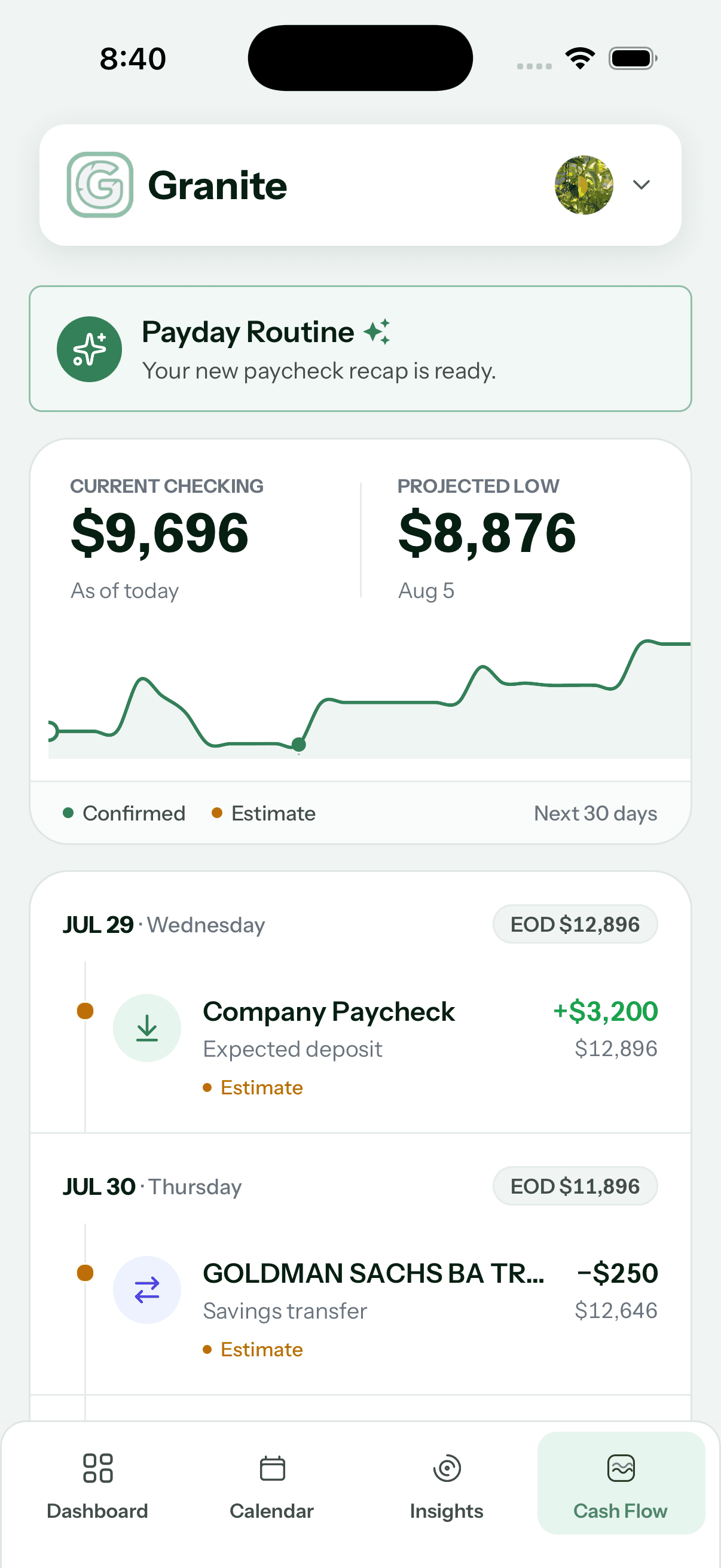
Current Checking is the starting point
Current Checking shows the latest balance Granite has for the checking account used by the forecast. Every projected event is applied to that starting amount.
A recent purchase, deposit, or transfer may not be reflected immediately if the institution has not yet supplied it. Compare the “as of today” figure with your bank before relying on the forecast for a time-sensitive decision.
Projected Low shows the tightest point
Projected Low is the lowest estimated end-of-day balance during the next 30 days, together with the date Granite expects that low point. A positive number can still deserve attention if it leaves less buffer than you prefer.
If the running balance is projected to fall below zero, Granite also identifies the first date that happens. Review the events immediately before that date to understand what creates the shortfall.
Follow the 30-day balance curve
The line on the forecast board represents the estimated end-of-day balance as events occur. Select a point to inspect the balance projected for that date.
Upward movement generally represents an expected deposit. Downward movement generally represents a bill, card payment, transfer, or other projected outflow. Several events on the same date are combined into that day’s ending balance.
Review each upcoming event
Upcoming events are generated from recurring activity Granite can identify and, when available, supported credit-card statement obligations. Each event has an expected date and amount and is applied to the running balance.
- Expected deposits add to the projected checking balance
- Bills and other expected outflows reduce it
- An Estimate label means the recurring prediction has lower confidence
- No upcoming events means Granite does not currently have recurring movements to place in the 30-day window
Estimated events can change
Recurring transactions do not always arrive on the same calendar day or for exactly the same amount. Granite projects the next occurrence from the history it has, so variable utilities, shifting paydays, holidays, and merchant processing can all create differences.
Treat an estimated event as a planning signal. The forecast becomes more useful when the recurring pattern is stable and Granite has seen enough examples to recognize it.
When credit-card due dates are unavailable
If a connected credit account is present but Granite cannot retrieve its liability or due-date information, the forecast may omit that card payment and display a Credit card due dates unavailable message. This can make the projected balance look higher than it would after the real payment.
Use the reconnect option when offered, then allow the institution time to provide updated information. Until the warning clears, check the card issuer directly and mentally reserve room for any payment you expect.
Adjust the forecast when you know more
You can edit the projected amount of an upcoming event when you know the next deposit or bill will differ from the estimate. A recurring event can also be removed from the forecast when it no longer belongs, and an edited recurring amount can be reset to Granite’s estimate.
Supported credit-card payment events can be adjusted, but they cannot be removed from the forecast in the same way as an ordinary recurring event. If a card amount or due date remains incorrect, verify it with the issuer and review the connection status.
Why a new connection may show a partial forecast
Granite needs transaction history to recognize recurring deposits and outflows. During roughly the first 30 days after you join or connect activity, the forecast may be missing planned movements or may label more events as estimates.
More history can improve pattern recognition, but a future event can still differ from its past pattern. Add known obligations to your decision-making even when they have not appeared on the board yet.
What the forecast does not include or promise
- It is not a real-time guarantee from your bank
- It does not predict one-time purchases Granite has no reason to expect
- It may omit a credit-card payment when due-date information is unavailable
- It is not a full net-worth projection across every asset and debt
- It does not schedule, cancel, or execute any payment
If the forecast looks wrong
If you still cannot explain the difference, contact Granite with the event name, approximate date, displayed amount, and what you expected. Never send passwords, verification codes, or full account numbers.
- Compare Current Checking with the latest balance at your institution
- Look for a missing, duplicated, or outdated recurring event
- Open estimated events and compare their amount and timing with what you expect
- Check for the credit-card due-date warning
- Review whether the correct checking account is connected and current
- Remember that a brand-new connection may not yet have enough history
Continue learning
Keep building the full picture
Getting started
What is Granite Finance?
Learn how Granite turns your financial plan and connected-account activity into a daily budget, cash-flow context, and clearer spending decisions.
Getting started
Getting started with Granite in five minutes
Add the financial plan behind your budget, connect the accounts you use for spending, and know what to check first.
Guides
How to understand Granite Insights
Read your monthly snapshot, six-month trends, category spending, largest expenses, and savings progress without mixing unlike totals.
Guides
Connected accounts and pending transactions
Follow a transaction from secure account connection through Plaid, Granite synchronization, pending activity, and your updated budget.
Guides
Budgeting when you are paid monthly
Learn how to budget on one monthly paycheck while paying your credit-card statement, covering current expenses, and protecting savings.