

Guides
How to read the Granite calendar
See daily spending, daily budget history, overspending days, and upcoming recurring activity in one monthly view.
A month of daily decisions in one place
The Calendar turns a list of transactions and changing budget numbers into a view of the month. Choose a month at the top, then switch between Spending View and Budget View depending on the question you are trying to answer.
The calendar is most useful for spotting timing: when spending clustered, when a day moved beyond its budget, and where known recurring activity may create pressure later in the month.
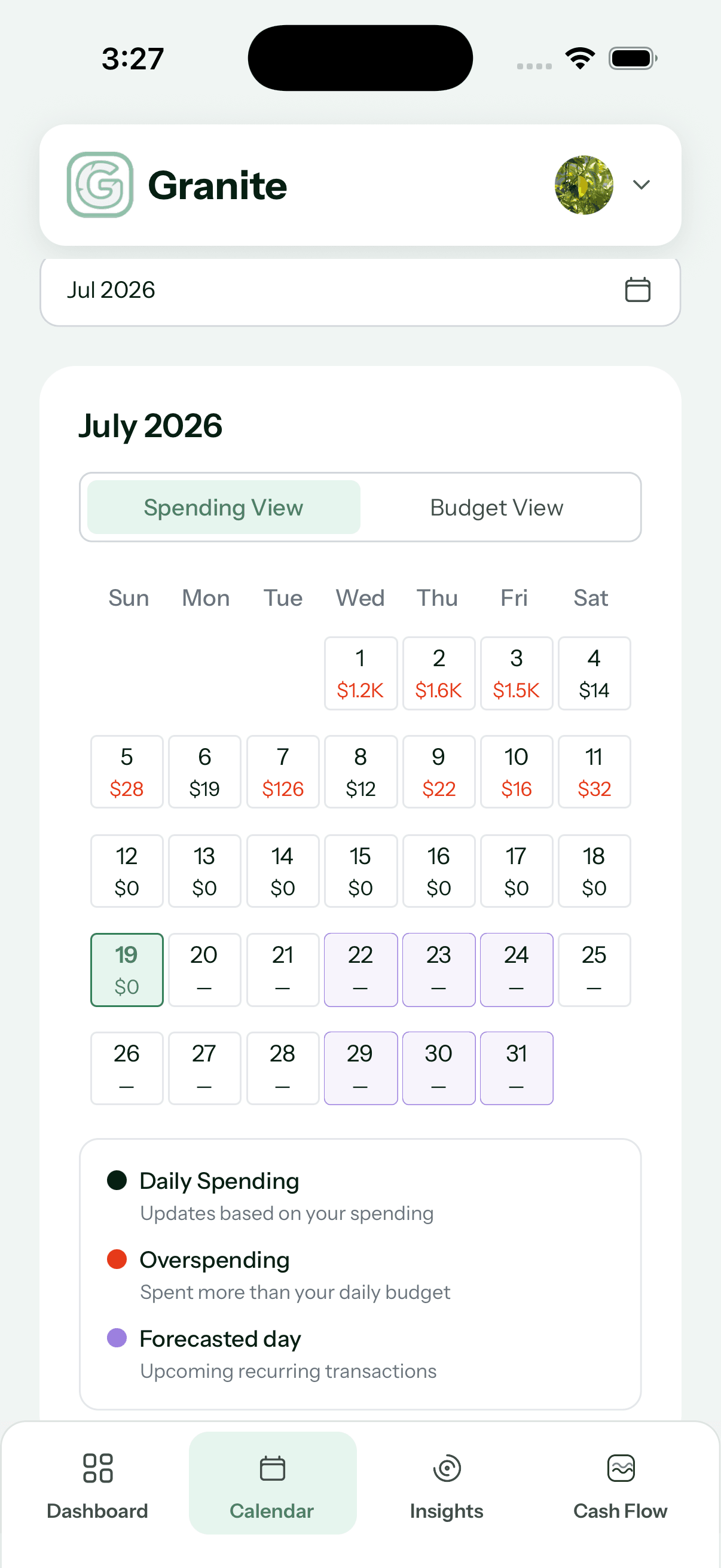
Spending View answers “What happened?”
For completed days, each calendar cell shows the spending Granite has associated with that date. A red amount means spending for that day was greater than the daily budget available for the same day.
One red day is context, not a verdict. It can reflect a planned larger purchase, several ordinary expenses landing together, or a day that simply used more of the month’s flexibility.
Budget View answers “What was available?”
Switch to Budget View to see the daily budget recorded for completed days. Reading this alongside Spending View helps explain whether a day was expensive because spending was unusually high, the available daily budget had already moved lower, or both occurred together.
Future days show a dash rather than pretending the eventual daily amount is already known.
Purple days help you look ahead
A purple forecasted day contains upcoming recurring activity Granite can place on that date. That might include a recurring bill, savings transfer, or expected income stream, depending on the financial information currently available.
Forecasts are planning context. Dates and amounts can still change when the real transaction arrives or when you update the recurring plan.
Tap a date for the details
Select a completed day to review the transactions behind its total. Select a future forecasted day to review the recurring activity expected for that date. This is the bridge between the monthly pattern and the individual items creating it.
Continue learning
Keep building the full picture
Getting started
What is a daily budget? Meaning and examples
Learn what a daily budget means, see a simple example, and understand how Granite turns a monthly financial plan into useful spending context.
Guides
How to search and filter transactions in Granite
Find the activity you need by merchant, category, account, date, amount, or transaction status.